Taps & gestures
Put every tap in place.
Build single-tap or multi-point sequences. Add long presses, double taps, swipes, and the pauses each step needs.

AT AutoClicker
MADE FOR ANDROID
Your taps, swipes, and routines — on repeat. A lightweight Android auto clicker with image matching and presets you can make your own.
v0.13.2 · Android 8.0+ · Universal APK · No root
1.58 MB
Small download
6
Languages
On-device
Image matching
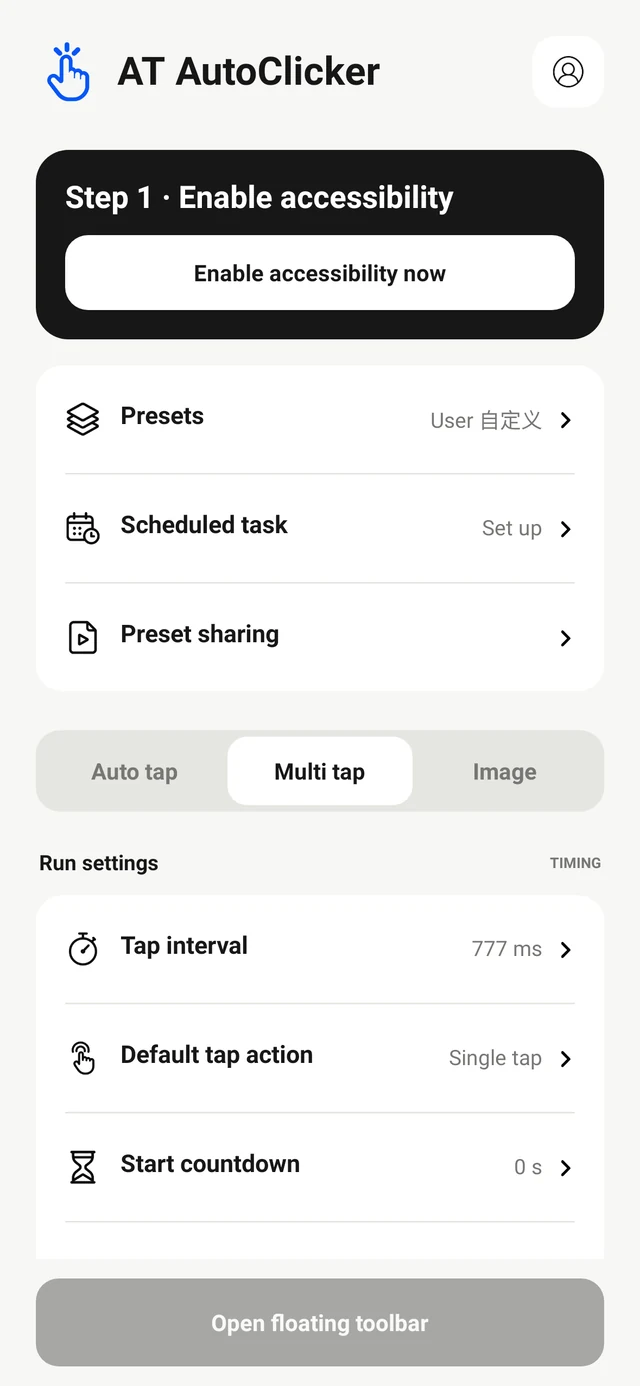
The actual app. A simple place to start.
Feels at home in your language.
English简体中文DeutschFrançaisEspañol日本語
A routine, your way
Start small. Add actions when you need them. Keep the controls close and the screen clear.
Build single-tap or multi-point sequences. Add long presses, double taps, swipes, and the pauses each step needs.
Capture a target, then choose what happens when it appears. Use multiple samples and follow-up actions, or recognize targets in sequence.
Save a touch recording as its own script. Keep your recordings separate from tap presets, then edit or replay them when you need them.
Save your setup, download community presets, or sign in to publish your own. Pro adds scheduled runs with time selection down to the second.
Room to work
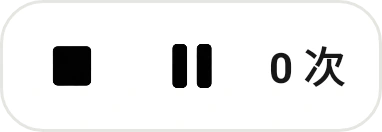
While a task runs, the toolbar shrinks to stop, pause, and an execution count. Pause whenever you need a moment, then continue your sequence.
Get started
Download directly from our server. The app walks you through setup the first time you open it.
Open the APK on your phone. Allow installation from your browser or file manager if Android asks.
Follow the illustrated guide and enable AT AutoClicker in Android’s accessibility settings. This lets the app perform the gestures you configure.
Open the floating toolbar, add your actions, and start. For image matching, select a target and approve screen capture when prompted.
Free to start
Up to 3 tap points per preset and 1 saved recording. Sign in for 3 free image-action trial uses each day.
Unlock image automation and scheduled tasks, with more tap points and saved recordings. Manage your existing subscription in the app.
The universal APK supports Android 8.0 and later. It is not restricted to one phone brand or processor architecture. Accessibility settings, screen capture permission, and background behavior can vary by manufacturer.
No. Taps and gestures use Android’s accessibility service, which you enable yourself. Image matching also needs permission to capture the screen. The app includes a visual setup guide.
Free users can add up to 3 tap points per preset and save 1 recording. Signed-in free users receive 3 image-action trial uses each day, resetting at 00:00 UTC. Pro removes these free-tier limits and enables scheduled tasks.
Yes. Matching runs locally without downloading a large AI model. Account sign-in, entitlement checks, free trial usage, and community preset sharing use the internet. A preset and its included target images are uploaded only when you explicitly publish it.
Download the APK on your Android phone and open it. If Android asks, allow installation from the browser or file manager you used. Then open AT AutoClicker and follow its accessibility setup guide. On Android 13 and later, a sideloaded app may also require Allow restricted settings in the app’s system settings before accessibility can be enabled.
Yes. Sign in with your AT AutoClicker website account to view your subscription, manage Pro, and publish presets. Basic tap automation can be used without an account.
AT AutoClicker v0.13.2 · 1.58 MB · Android 8.0+